
Still need help?
Get in touch with the Education Portfolio team by logging a ticket via ServiceConnect. We'll be in touch shortly.
Log a ticketWant to provide feedback on this resource? Please log in first via the top nav menu.
Zoom Webinars allow hosts and designated panellists to broadcast video, audio and screenshare to large numbers of view-only attendees. Attendees can interact through Q&A, chat, and answering polling questions. The Webinar host also has the option to unmute attendees if required.
UTS has a limited number of webinar licenses. These licences may incur a cost for your faculty so please read through the information on this page to make sure a webinar is the format you want before requesting a license.
Zoom Webinars are very different to Zoom meetings in the way they are set up, scheduled, and customised. They also offer a completely different experience for the participants and the hosts. Before you decide to run a Zoom Webinar, you need to consider the points below.
Zoom Webinars are designed for events with a large number of expected attendees. Because of this, they are significantly more complex for hosts to run and therefore require multiple co-hosts to assist in the set-up and operation of the webinar.
Every staff member and student at UTS is given a Zoom Workplace for Education licence. Staff are assigned the Education Staff licence, which includes the ability to host meetings and webinars for up to 500 participants. Students are assigned the Education Student licence, which supports meetings with up to 300 participants. There are also a limited number of additional large meeting licences that can increase the number of allowed participants in a standard Zoom meeting up to 500 for specific cases.
For webinars requiring more than 500 participants, additional webinar licences (up to 1000 or 3000 participants) are available to UTS staff upon request through ServiceConnect. Faculties will be billed monthly for each of these extended webinar licences that are approved and granted.
Zoom Webinar is largely a one-way experience. The most your attendees can do is ask a question via chat message. So as a host, you will need an assistant to answer those questions for you.
If your event does not require participation – it is, for example, a demonstration, then you may request a Zoom Webinar, keeping in mind this will likely be the same as watching a recording.
If you require any interaction with or between attendees, then Webinars are not appropriate. If you are expecting attendance to be more than 300 and would like to interact with your participants during your session, consider splitting the attendance over 2 or more Zoom meetings instead.
A Webinar is you talking the whole time. This is tiring for you and your audience. Unless you have another speaker to take turns with you, or you are channelling Tony Robbins, you may not want to be the centre of attention.
A ‘Personal learning experience’ and ‘Digital partners for learning’ are two cornerstones of the UTS 2027 strategic initiatives. The Webinar format may not align well with these initiatives. Students with a strong sense of autonomous learning will survive your Webinar, but they would miss out on the opportunity to interact by participating in your online session through active dialogue.
You will need to complete an application process if your event requires a webinar licence larger than the standard staff entitlement. If you need to host a webinar with more than 500 participants, submit an online application. After the application is received, your request will be reviewed and you may be required to have a consultation with a Learning Design and Technology Specialist from the Education Portfolio.
The Live Transcription feature in Zoom is available for Zoom Webinars. Refer to the Zoom Live Transcription (automated captioning) resource for more information on how to enable this feature.
If you require more help with setting up your Zoom Webinar, you can get in touch with AVS the following ways:
| FEATURE | MEETING | WEBINAR |
|---|---|---|
| Roles | Host and co-host Participant | Host and co-host Panelist Attendee |
| Maximum participants | 500 for staff, 300 for students | 500 for staff; larger webinars require special licence |
| Audio sharing | All participants can mute/unmute their own audio Host can mute/request to unmute participants The host can set all participants to mute upon entry | Only the host and panellists can mute/unmute their own audio Attendees join in listen-only mode The host can unmute one or more attendees |
| Video sharing | All participants | Only hosts and panellists |
| Participant list | Visible to all participants | Only visible to hosts and panellists |
| Example scenarios | Meeting Class Training session | Town hall meeting Large public lecture Quartery update |
If you have reviewed the above information and have decided that Zoom webinars are suitable for your needs, follow the below steps to apply for a license to host a Zoom webinar.
Go to ServiceConnect and select IT from the top navigation menu.
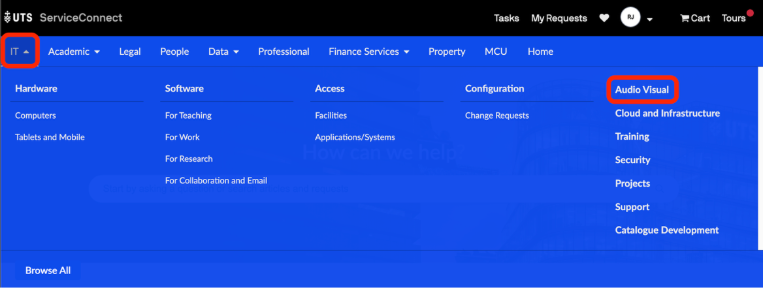
Under Audio Visual, select Zoom Additional License Request.

Complete the Zoom Additional License Request form.
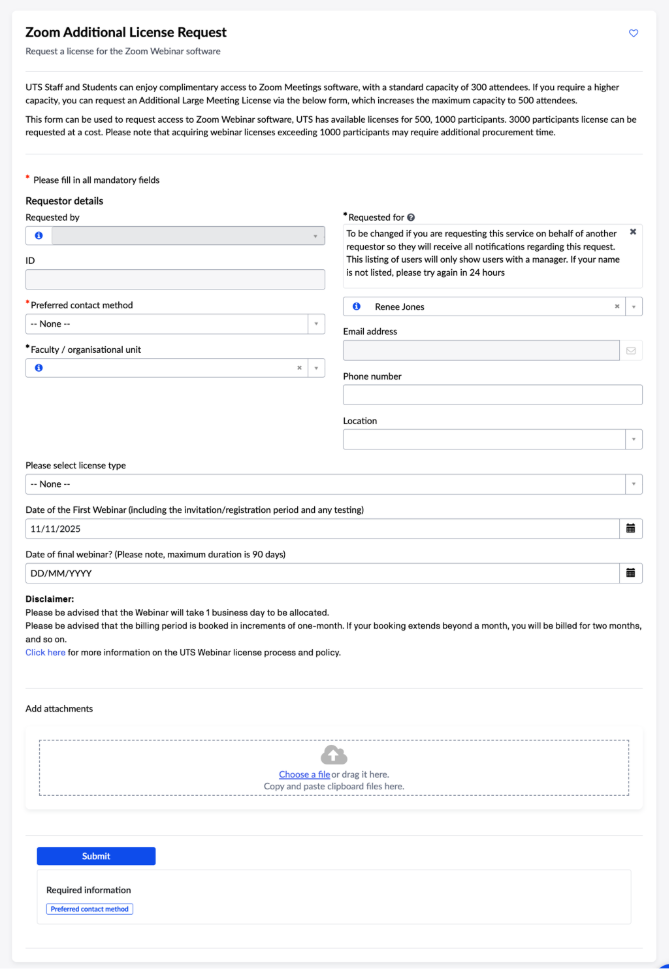
Every staff member and student at UTS is automatically granted a Zoom Workplace for Education Enterprise licence, which allows meetings of up to 300 participants.
If a higher capacity is required, you can request one of the following:
Webinar licences for above 500 participants are limited, may require additional procurement time, and incur a cost to your faculty. Approved licences are typically valid for up to three months at a time.
Once your request has been approved, you can schedule and manage your webinar from the Webinars section of your UTS Zoom account. Refer to the Zoom Webinar help pages for detailed guidance on scheduling and hosting your session.
UTS has a pool of about 4100 Enterprise Staff licences. If this pool is exhausted, new staff logging in may temporarily receive an Enterprise Student licence until a staff licence becomes available. They would lose automatic Webinar access until they are reassigned a staff licence.
Get in touch with the Education Portfolio team by logging a ticket via ServiceConnect. We'll be in touch shortly.
Log a ticketWant to provide feedback on this resource? Please log in first via the top nav menu.